Hello Ubuntu people,
It has been a while since my last post. To be honest i have realized that writing blog is not that easy job specially when only motivation is purely altruistic. So i believe you will understand. I missed you and your questions and i will try to change this practice and be more regular in writing posts.
Recently i have visited Kubutnu website and there i found section for some native KDE games. I am not sure if they will work on GNOME - probably yes but with installing some additional KDE packages. I found eight of them very interesting and addictive so i will show you some of them.
KAtomic
This is a game very similar with Sokoban. I believe that my age computer users remember this game. :) The point is to put objects in the same position like on the picture. It is logic game which demands a lot a patient and mind skills.
 KDiamond
KDiamond is a very popular game for even for Windows users. I will always remember it because i used to click for a million times while i was talking on the phone :) Very relaxing and not particularly demanding.
 KBreakOut
KBreakOut is very popular game which i can recall even on Spectrum a used to use when i was just 4 years old. Very addictive game and if you are weak on this kind of games stay away of it :)
 KMahjongg
This is another very popular game in which you have to find two matching tiles in order to solve this pile. It is very funny to play even in two players and i really suggest it. It is nicely done and looks quite nice. There are various types of piles so check it also. Enjoy in one of my favorite simple games.
 KNetWalk
I played similar game before with some other theme but this one is really for geeks. :) The point is to join few monitors on the Internet :) You have several pipes which you need to rotate in order to have your screens working. Nice game.
 KSquare
I played this game like a child on the piece of paper with my brother. Game is very interesting and tactical since the point is to avoid possibility to opponent to close one square. It is pretty easy to understand and it is for two players. I believe that you can play it with the computer but believe me playing it with girlfriend or boyfriend in striptease is much more interesting :)
 KSudoku
I believe that a lot of you know about Sudoku. It is great brain trainer so when you want to relax play few games but try not to frustrate yourself. Just use your gray brain cells and you will see great advance.
 Bovo
Bovo
Bovo is another interesting game which i used to play like a kid. Is is great to play with another player but you can also play it with computer which is pretty intelligent :) The point is to have four tiles in the row, diagonal or vertical/horizontal, so you can win the game. You will really need to make some effort with your brain. :) I believe you will succeed.
 I hope you will like my choice of simple games. If you have some other to recommend please do so.
Until my next post i hope you will be cool.
Enjoy,

It has been a while since my last post. To be honest i have realized that writing blog is not that easy job specially when only motivation is purely altruistic. So i believe you will understand. I missed you and your questions and i will try to change this practice and be more regular in writing posts.
Recently i have visited Kubutnu website and there i found section for some native KDE games. I am not sure if they will work on GNOME - probably yes but with installing some additional KDE packages. I found eight of them very interesting and addictive so i will show you some of them.
KAtomic
This is a game very similar with Sokoban. I believe that my age computer users remember this game. :) The point is to put objects in the same position like on the picture. It is logic game which demands a lot a patient and mind skills.

KDiamond is a very popular game for even for Windows users. I will always remember it because i used to click for a million times while i was talking on the phone :) Very relaxing and not particularly demanding.

KBreakOut is very popular game which i can recall even on Spectrum a used to use when i was just 4 years old. Very addictive game and if you are weak on this kind of games stay away of it :)

This is another very popular game in which you have to find two matching tiles in order to solve this pile. It is very funny to play even in two players and i really suggest it. It is nicely done and looks quite nice. There are various types of piles so check it also. Enjoy in one of my favorite simple games.

I played similar game before with some other theme but this one is really for geeks. :) The point is to join few monitors on the Internet :) You have several pipes which you need to rotate in order to have your screens working. Nice game.

I played this game like a child on the piece of paper with my brother. Game is very interesting and tactical since the point is to avoid possibility to opponent to close one square. It is pretty easy to understand and it is for two players. I believe that you can play it with the computer but believe me playing it with girlfriend or boyfriend in striptease is much more interesting :)

I believe that a lot of you know about Sudoku. It is great brain trainer so when you want to relax play few games but try not to frustrate yourself. Just use your gray brain cells and you will see great advance.

Bovo is another interesting game which i used to play like a kid. Is is great to play with another player but you can also play it with computer which is pretty intelligent :) The point is to have four tiles in the row, diagonal or vertical/horizontal, so you can win the game. You will really need to make some effort with your brain. :) I believe you will succeed.

Until my next post i hope you will be cool.
Enjoy,

Finally you will have a chance to read some tutorial for GIMP and that is only Veter is helping me. Thank you Veter for a great job. I know that you have spend at least few hours on this. We will start with something simple which we will need later so we must have tutorials about how to add brushes in GIMP. Also Veter will present you 13 brushes he likes best! Enjoy!
In Linux environment GIMP common files are in the folder /home/YOUR_USERNAME/.gimp-2.6. Because this is hidden folder you will have to press ALT+. There are folders for:
brush - brushes /
gradients - gradients /
pallets - palettes /
patterns - patterns /
scripts - scripts /
Brushes
GIMP brushes are in brushes folder. If you want to install new brushes, just download them and copy all .gbr files to folder /home/YOUR_USERNAME/.gimp-2.6/brushes


If you have GIMP running you will need to refresh brushes by pressing refresh button in the brushes window. If GIMP is turned off, just run it, and new brushes will be added automatically.

In addition the GIMP can read files Photoshop brushes with extension .abr. The installation is the same as in the case of .gbr files!
NOTE:
Having a large number of brushes can improve our workshop, but their large number could significantly delay the start GIMP (up to several minutes), so it's best to leave in its library only needed paint brushes, or those in the best qualities (GIMP brushes can scale so there is no need keeping the same brushes in different sizes).
The best brushes for GIMP
The Web is full of brushes for GIMP, although not all of them are good quality. They are small in size, or are ill-prepared transparency. I prepared a list of interesting brushes to GIMP. I will update it periodically with new brushes (Click image to go to the brush download page.)
PS.Not all of brushes in packs are good, so it is good to filter them after installation and leave only best ones.


I hope you like it. More tutorials for GIMP will come soon and in the mean time practice and experiment! It doesn't hurt :)
We will keep this page updated with more and more new and interesting brushes!
Cheers,
![Reblog this post [with Zemanta]](https://lh3.googleusercontent.com/blogger_img_proxy/AEn0k_tzQGdkES3flfZvFkl-oQeUjHGlxOkE9Su-6qhM4lijcFflpeg3fHCQW28LIPbxhpfgKTzQhvo5EoP32mqFYGx57zMLvwFEjqIHCI9-MZALDYFZG2A5mrUJx1IvVaAnSPcy8ltHmPniYgyyqtfgOV4=s0-d)

For many times i was reading about Dropbox and the whole bunch of similar services and i just didn't understand why it is so important!? I have younger brother. He is web designer. I also have flat mate he is expert for internet marketing and product retailing, writer, reader and more. Three of us quite often work together on some internal internet projects. Many times we exchange dozens of files between each others. Well i could say that we are stupid we never even read anything about Dropbox and similar services.
What is so fascinating? :)
For me the best thing about Dropbox is a fact that once upon installation is finished, it creates a folder, named Dropbox in your Home folder, and then magic starts. You just need to add file in this folder and it will be automatically uploaded to your Dropbox account. Dropbox advertise their services something like "go wherever you want your files will be close to you" which is quite correct but i think that in this story that will not be a point.

Imagine that you have five friends working on the same project - some website, scientific project, NGO project or some other activity which demands few people involvement. You need to coordinate million files all the time, million of email and chats. Well that is totally simplified with Dropbox. Now you can share one or more folders, which are inside you Dropbox folder, and then to add files directly into it. Almost at the same moment your friends will be notified that you have add something. They can look at it, change it, rename it or delete it. Good thing is also that you can start that file from Dropbox folder and upgrade it. After saving changes your friends will be notified that you have updated file!
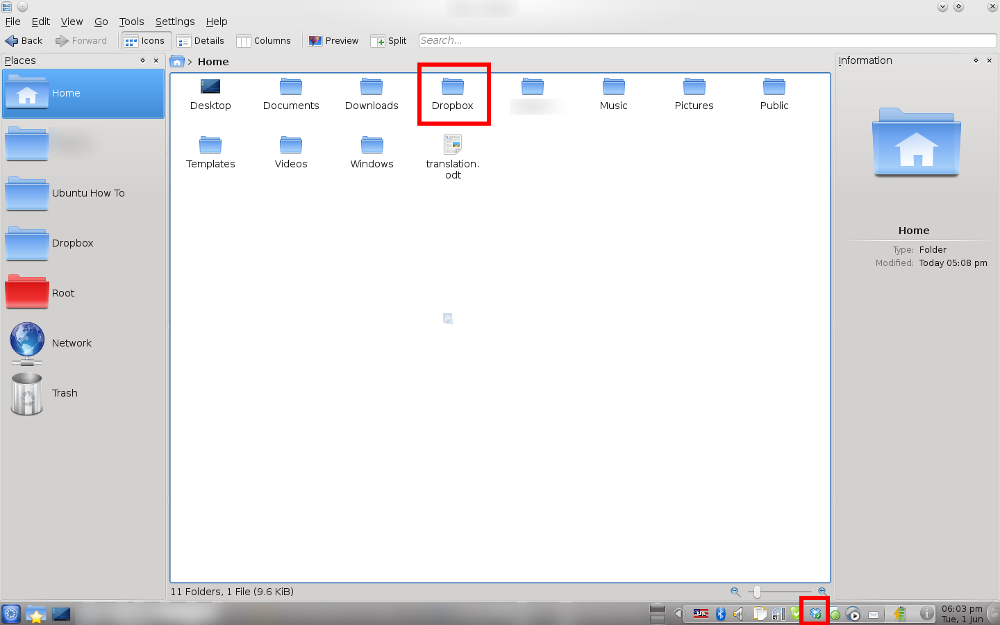

Beside my small trio with my brother and flatmate, i am using Dropbox now to coordinate this blog with other people who want to help. It is great that at the very same moment you can work and sync with the people from USA, Panama and Poland. Just great and i can say that Dropbox really changed my efficiency and time management!
Thank you for reading,
My rate: * * * * *
Purpose: File sharing and syncing
Download: You can download from official website if you click here
![Reblog this post [with Zemanta]](https://lh3.googleusercontent.com/blogger_img_proxy/AEn0k_s187iM6CztwIbGEXSXoRvGTTTgEDjqSmCJA5S-WSI7Z9tsVoDI2Ddqk5Jb8gi5asJxNlDXHTeqxctwE4TCuJoKy_QjWoSyktWjboeGzb72QfP5vNdi64ip0cVkB3o5DCH7CFeFiNTA4ERF2Nkc2S_M=s0-d)


Recent Comments